


Open DSR4U
DSR4U • OFFICIAL USER GUIDE

Learn DSR4U,
one page at a time.

A premium online handbook for understanding the DSR4U Loan Management System — from EMI and eligibility to payments, analysis, settlement and PDF statements.

↓ Download PDF Guide
DSR4U visual reference
CHAPTER 01

Getting started

Start with the calculator you need, or build a private dashboard for your existing loans.

01 / 09
🇬🇧 ENGLISH

Choose your path

  1. Use EMI Calculator when you want to estimate a repayment.
  2. Use Eligibility Calculator when you want an indicative borrowing estimate.
  3. Use Loans when you already have one or more loans to track.
  4. Use How to Use whenever you need a quick explanation.
Your entries are used for calculations in the browser. DSR4U is an independent planning and analysis tool, not a lender.
🇱🇰 தமிழ்

உங்கள் வழியைத் தேர்ந்தெடுக்கவும்

  1. தவணையை மதிப்பிட EMI Calculator பயன்படுத்தவும்.
  2. கடன் பெறும் சாத்தியத்தை மதிப்பிட Eligibility Calculator பயன்படுத்தவும்.
  3. ஏற்கனவே உள்ள கடன்களை நிர்வகிக்க Loans பயன்படுத்தவும்.
  4. விளக்கம் தேவைப்பட்டால் How to Use பக்கத்தைப் பயன்படுத்தவும்.
DSR4U ஒரு சுயாதீனமான திட்டமிடல்/பகுப்பாய்வு கருவி; இது கடன் வழங்குநர் அல்ல.
🇱🇰 සිංහල

ඔබගේ මාර්ගය තෝරන්න

  1. වාරිකයක් ඇස්තමේන්තු කිරීමට EMI Calculator භාවිතා කරන්න.
  2. ණය ලබාගැනීමේ හැකියාව ඇස්තමේන්තු කිරීමට Eligibility Calculator භාවිතා කරන්න.
  3. දැනට ඇති ණය කළමනාකරණයට Loans භාවිතා කරන්න.
  4. උපදෙස් අවශ්‍ය නම් How to Use පිටුව භාවිතා කරන්න.
DSR4U ස්වාධීන සැලසුම්/විශ්ලේෂණ මෙවලමකි; එය ණය දෙන ආයතනයක් නොවේ.
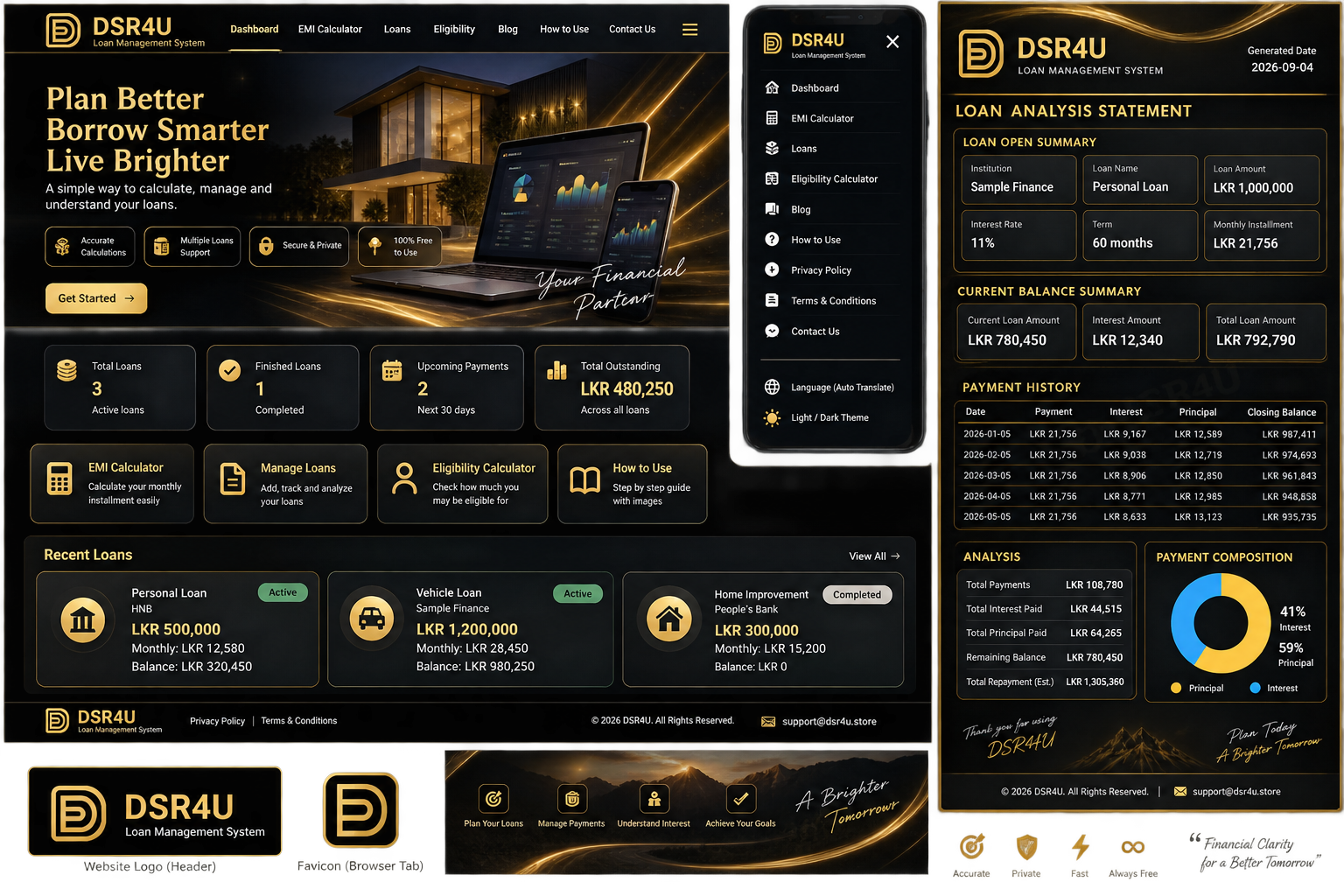
DSR4U loan dashboard reference
Reference view: dashboard, mobile navigation and loan statement concept.
CHAPTER 02

EMI Calculator

Estimate repayment before you commit to a loan.

02 / 09
🇬🇧 ENGLISH

How to calculate EMI

  1. Enter the loan amount.
  2. Enter the annual interest rate supplied by your lender.
  3. Choose Reducing / Compound or Simple / Flat.
  4. Enter the term in months or years.
  5. Select the currency.
  6. Review the installment, total interest and repayment schedule.
🇱🇰 தமிழ்

EMI கணக்கிடுவது எப்படி

  1. கடன் தொகையை உள்ளிடவும்.
  2. கடன் வழங்குநர் கொடுத்த வருடாந்திர வட்டி விகிதத்தை உள்ளிடவும்.
  3. Reducing / Compound அல்லது Simple / Flat முறையைத் தேர்வு செய்யவும்.
  4. மாதங்கள் அல்லது ஆண்டுகளில் காலத்தை உள்ளிடவும்.
  5. நாணயத்தைத் தேர்வு செய்யவும்.
  6. தவணை, மொத்த வட்டி மற்றும் திருப்பிச் செலுத்தும் அட்டவணையைப் பார்க்கவும்.
🇱🇰 සිංහල

EMI ගණනය කරන ආකාරය

  1. ණය මුදල ඇතුළත් කරන්න.
  2. ණය ආයතනය ලබාදුන් වාර්ෂික පොලී අනුපාතය ඇතුළත් කරන්න.
  3. Reducing / Compound හෝ Simple / Flat තෝරන්න.
  4. මාස හෝ අවුරුදු ලෙස කාලය ඇතුළත් කරන්න.
  5. මුදල් ඒකකය තෝරන්න.
  6. වාරිකය, මුළු පොලිය සහ ගෙවීම් කාලසටහන පරීක්ෂා කරන්න.
TipUse the exact rate from your loan offer or statement.
CompareTry different terms to see how the installment changes.
RememberResults are estimates and may differ from lender calculations.
CHAPTER 03

Eligibility Calculator

Build an indicative estimate from income, deductions, retirement information, rate and term.

03 / 09
🇬🇧 ENGLISH

Enter your financial picture

  1. Add date of birth and retirement year or age.
  2. Enter interest rate and the Limit (%).
  3. Choose loan term and interest method.
  4. Add monthly income sources.
  5. Add existing deductions or commitments.
  6. Review estimated approved amount, installment and new limit.
Label update: the field is intentionally named Limit (%) for clearer, lender-neutral wording.
🇱🇰 தமிழ்

உங்கள் நிதி விவரங்களை உள்ளிடவும்

  1. பிறந்த தேதி மற்றும் ஓய்வு பெறும் ஆண்டு/வயதை உள்ளிடவும்.
  2. வட்டி விகிதம் மற்றும் Limit (%) உள்ளிடவும்.
  3. கடன் காலம் மற்றும் வட்டி முறையைத் தேர்வு செய்யவும்.
  4. மாத வருமானங்களைச் சேர்க்கவும்.
  5. தற்போதைய கழிவுகள்/கடன் பொறுப்புகளைச் சேர்க்கவும்.
  6. மதிப்பிடப்பட்ட கடன் தொகை மற்றும் தவணையைப் பார்க்கவும்.
🇱🇰 සිංහල

ඔබගේ මූල්‍ය තොරතුරු ඇතුළත් කරන්න

  1. උපන් දිනය සහ විශ්‍රාම වසර/වයස ඇතුළත් කරන්න.
  2. පොලී අනුපාතය සහ Limit (%) ඇතුළත් කරන්න.
  3. ණය කාලය සහ පොලී ක්‍රමය තෝරන්න.
  4. මාසික ආදායම් එකතු කරන්න.
  5. දැනට පවතින අඩු කිරීම්/වගකීම් එකතු කරන්න.
  6. ඇස්තමේන්තුගත ණය මුදල සහ වාරිකය පරීක්ෂා කරන්න.
EligibilityFinancial details → result → analysis
CHAPTER 04

Add & manage loans

Create a separate record for each bank, finance company or cooperative loan.

04 / 09
🇬🇧 ENGLISH

Create a loan record

  1. Tap Add New Loan.
  2. Enter loan name and institution.
  3. Enter original amount, rate type, interest method and annual rate.
  4. Enter term, payment frequency and loan open date.
  5. For a variable-rate loan, add the rate schedule by payment number.
  6. Save, then open the loan for analysis.
🇱🇰 தமிழ்

ஒரு கடன் பதிவை உருவாக்கவும்

  1. Add New Loan அழுத்தவும்.
  2. கடன் பெயர் மற்றும் நிறுவனத்தை உள்ளிடவும்.
  3. ஆரம்ப தொகை, வட்டி வகை, வட்டி முறை மற்றும் வருடாந்திர வட்டியை உள்ளிடவும்.
  4. காலம், தவணை இடைவெளி மற்றும் தொடக்க தேதியை உள்ளிடவும்.
  5. மாறும் வட்டி என்றால் payment number அடிப்படையில் rate schedule சேர்க்கவும்.
  6. சேமித்து, கடனைத் திறந்து பகுப்பாய்வு செய்யவும்.
🇱🇰 සිංහල

ණය වාර්තාවක් සාදන්න

  1. Add New Loan ඔබන්න.
  2. ණය නම සහ ආයතනය ඇතුළත් කරන්න.
  3. මුල් මුදල, පොලී වර්ගය, පොලී ක්‍රමය සහ වාර්ෂික පොලිය ඇතුළත් කරන්න.
  4. කාලය, ගෙවීම් වාරය සහ ආරම්භක දිනය ඇතුළත් කරන්න.
  5. Variable rate නම් payment number අනුව rate schedule එකතු කරන්න.
  6. සුරකින්න, පසුව විශ්ලේෂණය සඳහා ණය විවෘත කරන්න.
Keep each real-world loan separate. This makes institution-by-institution analysis clearer and avoids mixing currencies or repayment terms.
CHAPTER 05

Payments & loan analysis

Record actual payments to make your personal loan view more useful.

05 / 09
🇬🇧 ENGLISH

Record what you actually paid

  1. Open the loan analysis.
  2. Choose Add payment.
  3. Enter payment date and amount.
  4. Add an optional note.
  5. Save the payment.
  6. Review payment history, principal, interest and balance.
🇱🇰 தமிழ்

நீங்கள் செலுத்திய தொகையை பதிவு செய்யவும்

  1. கடன் பகுப்பாய்வைத் திறக்கவும்.
  2. Add payment தேர்வு செய்யவும்.
  3. செலுத்திய தேதி மற்றும் தொகையை உள்ளிடவும்.
  4. தேவையெனில் குறிப்பைச் சேர்க்கவும்.
  5. சேமிக்கவும்.
  6. செலுத்திய வரலாறு, அசல், வட்டி மற்றும் மீதியைப் பார்க்கவும்.
🇱🇰 සිංහල

ඔබ ගෙවූ මුදල් වාර්තා කරන්න

  1. ණය විශ්ලේෂණය විවෘත කරන්න.
  2. Add payment තෝරන්න.
  3. ගෙවූ දිනය සහ මුදල ඇතුළත් කරන්න.
  4. අවශ්‍ය නම් සටහනක් එක් කරන්න.
  5. සුරකින්න.
  6. ගෙවීම් ඉතිහාසය, මූලික මුදල, පොලිය සහ ශේෂය බලන්න.
DSR4U premium brand reference
Premium visual language: matte black, gold accents and clear information hierarchy.
CHAPTER 06

Early settlement

Use the settlement estimate to explore what paying off a loan early might look like.

06 / 09
🇬🇧 ENGLISH

Estimate an early payoff

  1. Open the selected loan.
  2. Go to the early settlement section.
  3. Choose a settlement date.
  4. Enter any lender settlement fee percentage or other fee if known.
  5. Review estimated settlement cost and potential saving.
Early settlement rules differ by lender. DSR4U provides an estimate based on the information you enter; confirm the final payoff amount with the lender.
🇱🇰 தமிழ்

முன்கூட்டிய தீர்வை மதிப்பிடவும்

  1. கடனைத் திறக்கவும்.
  2. Early settlement பகுதியைத் திறக்கவும்.
  3. தீர்வு தேதியைத் தேர்வு செய்யவும்.
  4. தெரிந்தால் settlement fee மற்றும் பிற கட்டணங்களை உள்ளிடவும்.
  5. மதிப்பிடப்பட்ட தீர்வு தொகை மற்றும் சேமிப்பைப் பார்க்கவும்.
இறுதி settlement தொகை கடன் வழங்குநரிடமே உறுதி செய்யப்பட வேண்டும்.
🇱🇰 සිංහල

කලින් පියවීම ඇස්තමේන්තු කරන්න

  1. අදාළ ණය විවෘත කරන්න.
  2. Early settlement කොටස වෙත යන්න.
  3. පියවීමේ දිනය තෝරන්න.
  4. දන්නා නම් settlement fee සහ වෙනත් ගාස්තු ඇතුළත් කරන්න.
  5. ඇස්තමේන්තුගත පියවීමේ මුදල සහ ඉතිරිය පරීක්ෂා කරන්න.
අවසාන පියවීමේ මුදල ණය ආයතනයෙන් තහවුරු කරන්න.
CHAPTER 07

Statements & PDF

Turn your loan analysis into a clean, printable statement.

07 / 09
🇬🇧 ENGLISH

Save a statement

  1. Open a loan and review the analysis.
  2. Choose a PDF theme if available.
  3. Select Print / Save PDF.
  4. In the browser print dialog, choose Save as PDF.
  5. Keep the statement for your personal records.
🇱🇰 தமிழ்

அறிக்கையை சேமிக்கவும்

  1. கடனைத் திறந்து பகுப்பாய்வை சரிபார்க்கவும்.
  2. தேவையான PDF theme-ஐ தேர்வு செய்யவும்.
  3. Print / Save PDF தேர்வு செய்யவும்.
  4. Browser print window-ல் Save as PDF தேர்வு செய்யவும்.
  5. உங்கள் பதிவுக்காக சேமிக்கவும்.
🇱🇰 සිංහල

වාර්තාව PDF ලෙස සුරකින්න

  1. ණය විවෘත කර විශ්ලේෂණය පරීක්ෂා කරන්න.
  2. අවශ්‍ය PDF theme එක තෝරන්න.
  3. Print / Save PDF තෝරන්න.
  4. Browser print window එකේ Save as PDF තෝරන්න.
  5. ඔබගේ පෞද්ගලික වාර්තා සඳහා සුරකින්න.
Loan dashboard reference
Dashboard reference

Use the loan cards to open a specific loan and continue into analysis.

DSR4U website visual reference
Brand reference

Dark luxury styling with gold highlights is used throughout the guide.

CHAPTER 08

Interest terms

Understand the two separate choices: rate type and interest method.

08 / 09
🇬🇧 ENGLISH

Rate type ≠ interest method

  • Fixed: the annual rate stays unchanged in the model.
  • Variable: the rate can change according to the schedule you enter.
  • Reducing / Compound: interest is based on outstanding balance.
  • Simple / Flat: interest is based on original principal in this model.
🇱🇰 தமிழ்

வட்டி வகை மற்றும் வட்டி முறை வேறுபட்டவை

  • Fixed: மாதிரி கணக்கில் வருடாந்திர வட்டி மாறாது.
  • Variable: நீங்கள் கொடுக்கும் அட்டவணைப்படி வட்டி மாறலாம்.
  • Reducing / Compound: மீதமுள்ள கடன் தொகையை அடிப்படையாகக் கொண்ட வட்டி.
  • Simple / Flat: இந்த மாதிரியில் ஆரம்ப அசல் தொகையை அடிப்படையாகக் கொண்ட வட்டி.
🇱🇰 සිංහල

පොලී වර්ගය සහ පොලී ක්‍රමය වෙනස් වේ

  • Fixed: ආකෘතිය තුළ වාර්ෂික පොලිය වෙනස් නොවේ.
  • Variable: ඔබ ඇතුළත් කරන schedule අනුව පොලිය වෙනස් විය හැක.
  • Reducing / Compound: ඉතිරි ණය ශේෂය මත පොලිය ගණනය කරයි.
  • Simple / Flat: මෙම ආකෘතියේ මුල් ණය මුදල මත පොලිය ගණනය කරයි.
Always use the terminology and rate basis shown on your actual lender documents when entering data.
CHAPTER 09

Important notes

A final checklist before you rely on a result.

09 / 09
🇬🇧 ENGLISH

Use DSR4U with confidence

  • Enter figures from your latest lender documents.
  • Check dates, rate type, interest method and payment frequency.
  • Do not treat an estimate as an official lender quote.
  • Confirm settlement fees, penalties and final balances with your lender.
  • Your browser-stored loan data should be kept on a device you trust.
🇱🇰 தமிழ்

DSR4U-ஐ நம்பிக்கையுடன் பயன்படுத்தவும்

  • சமீபத்திய கடன் ஆவணங்களில் உள்ள தரவுகளைப் பயன்படுத்தவும்.
  • தேதி, வட்டி வகை, வட்டி முறை மற்றும் தவணை இடைவெளியைச் சரிபார்க்கவும்.
  • மதிப்பீட்டை அதிகாரப்பூர்வ lender quote எனக் கருத வேண்டாம்.
  • Settlement fee மற்றும் இறுதி மீதியை lender-ிடம் உறுதி செய்யவும்.
  • Browser-ல் சேமிக்கப்படும் தரவை நம்பகமான சாதனத்தில் வைத்திருங்கள்.
🇱🇰 සිංහල

DSR4U විශ්වාසයෙන් භාවිතා කරන්න

  • අලුත්ම ණය ලේඛනවල ඇති දත්ත භාවිතා කරන්න.
  • දිනය, පොලී වර්ගය, පොලී ක්‍රමය සහ ගෙවීම් වාරය පරීක්ෂා කරන්න.
  • ඇස්තමේන්තුව නිල ණය ආයතන quote එකක් ලෙස නොසලකන්න.
  • Settlement fee සහ අවසාන ශේෂය ණය ආයතනයෙන් තහවුරු කරන්න.
  • Browser තුළ ගබඩා වන දත්ත විශ්වාසදායක උපාංගයක තබා ගන්න.
© 2026 DSR4U. All rights reserved. This guide and its original written/visual content are provided for DSR4U users. The watermark and copyright notice are part of the guide design.
DSR4U • LOAN MANAGEMENT SYSTEM • © 2026 DSR4U. ALL RIGHTS RESERVED.